Using Argo to Orchestrate NMAP Against Millions of Targets#
Argo is perfect for repeatable tasks and workflows that can be reused just by supplying a different parameter. Today we will work through a basic recon phase for a generic bug bounty program.
💡 For this example we assume you have an understanding of Argo and are comfortable with the templating involved.
Take a look at my other articles on Argo if you’re new!!
Getting Started#
We are going to get a list of current AWS IPs and run NMAP over all of them
Lets create a new Argo template (yaml file) and start it off by filling in the following:
apiVersion: argoproj.io/v1alpha1 kind: Workflow metadata: generateName: scan-nmap-aws- # The name will generate names like scan-nmap-aws-XXXXX namespace: "argo" # Put it in the argo namespace spec: entrypoint: entry # This will be the entrypoint we make later volumeClaimTemplates: # This is the volume that gets shares between workflow steps - metadata: name: workdir # This is the name of our VolumeClaim spec: accessModes: ["ReadWriteOnce"] resources: requests: storage: 1Gi # The total storage capacity provided to/by the VolumeClai parallelism: 10 # Limits the number of NMAP containers to run at a time.What have we done above?
We created an empty workflow that will generate names similar to scan-nmap-aws-XXXXX
We put it in the argo namespace and create a VolumeClaim named workdir for our future steps to use.
Now we need to define some steps. If we’re going to scan all of AWS, we need to get those IP ranges first, huh? How might we do that? Well, believe it or not AWS provides these for us!
Get AWS IPs#
- name: get-ips # Name of the step script: image: byteknight/alpine-curl-jq:latest # The container image to use command: [sh, -c] # The command we execute args: # The args of the command we execute [ 'curl -s ''https://ip-ranges.amazonaws.com/ip-ranges.json'' | jq ''[.prefixes[] | select(.service | contains("EC2")) | .ip_prefix]'' > /tmp/ips.json', ] outputs: # The various outputs of the step parameters: - name: ips valueFrom: path: /tmp/ips.jsonNow we have the IPs we need, but we need to scan them via NMAP in another step. How do we do this?
Sending IPs to NMAP#
- name: run-nmap inputs: parameters: - name: target container: image: securecodebox/nmap:latest securityContext: privileged: true allowPrivilegeEscalation: true command: [nmap] args: [ "-sV", "-vv", "-T5", "-A", "-n", "--min-hostgroup", "100", "--min-parallelism", "200", "-Pn", "-oX", "/mnt/data/{{}}.xml", "{{inputs.parameters.target}}", ] volumeMounts: - name: workdir mountPath: /mnt/dataThis creates the NMAP container with the specified options and runs over the provided target(s). Now we need to combine all the steps, and create a master entry step that will handle passing the parameters and ordering the steps. For sake of the example, this is the entire script up to this point:
Putting It All Together#
apiVersion: argoproj.io/v1alpha1 kind: Workflow metadata: generateName: scan-nmap-aws- namespace: "argo" spec: entrypoint: entry volumeClaimTemplates: - metadata: name: workdir spec: accessModes: [ "ReadWriteOnce" ] resources: requests: storage: 1Gi parallelism: 10 templates: - name: entry # Newly created step to run everything dag: tasks: - name: get-aws-ips template: get-ips - name: nmap-aws template: run-nmap dependencies: [get-aws-ips] arguments: parameters: - name: target value: "{{item}}" withParam: "{{tasks.get-aws-ips.outputs.parameters.ips}}" - name: get-ips script: image: byteknight/alpine-curl-jq:latest command: [sh, -c] args: [ 'curl -s ''https://ip-ranges.amazonaws.com/ip-ranges.json'' | jq ''[.prefixes[] | select(.service | contains("EC2")) | .ip_prefix]'' > /mnt/data/ips.json', ] volumeMounts: - name: workdir mountPath: /mnt/data outputs: parameters: - name: ips valueFrom: path: /mnt/data/ips.json - name: test-output inputs: parameters: - name: input script: image: byteknight/alpine-curl-jq command: [bash] source: | echo {{inputs.parameters.input}} - name: run-nmap inputs: parameters: - name: target container: image: securecodebox/nmap:latest securityContext: privileged: true allowPrivilegeEscalation: true command: [nmap] args: [ "-sV", "-vv", "-T5", "-A", "-n", "--min-hostgroup", "100", "--min-parallelism", "200", "-Pn", "-oX", "/mnt/data/{{}}.xml", "{{inputs.parameters.target}}", ] volumeMounts: - name: workdir mountPath: /mnt/dataNow we submit it to argo like so:
$ argo submit -n argo aws-nmap.yaml --watchViewed from the Argo Server UI: 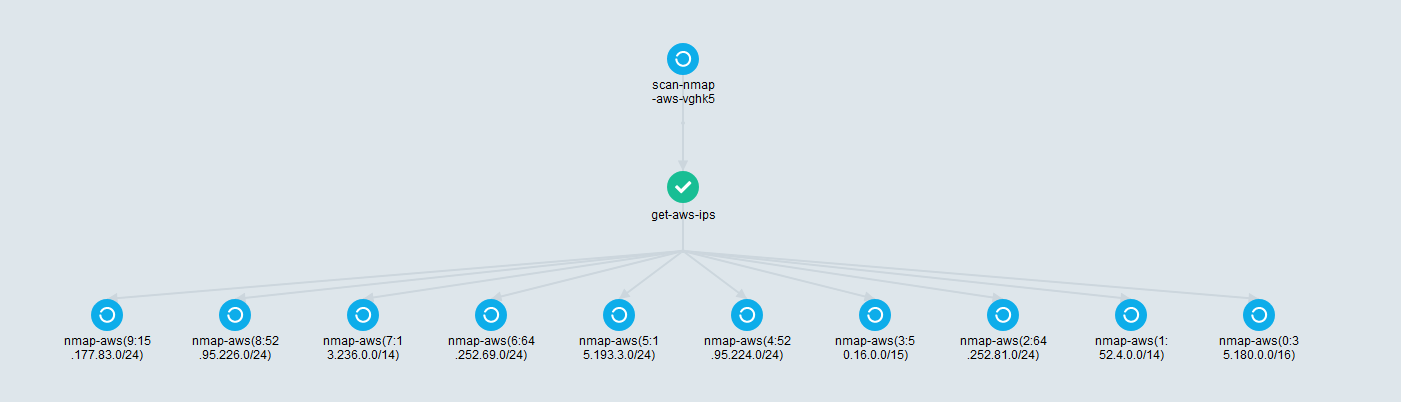
You can now retrieve your data from /mnt/data.
I hope this was useful to someone 🙂